Create your account
💡 Pro Tip:
Use the email address you'll keep. It's where reset links and confirmation emails go.
Open the sign-up page
You sign up on the NodeBook website. Get there in either of these ways:
- On the website, click Create for Free in the top bar.
- In the app, click Sign up free in the top bar. You see it when you're looking at a shared NodeBook without being logged in.
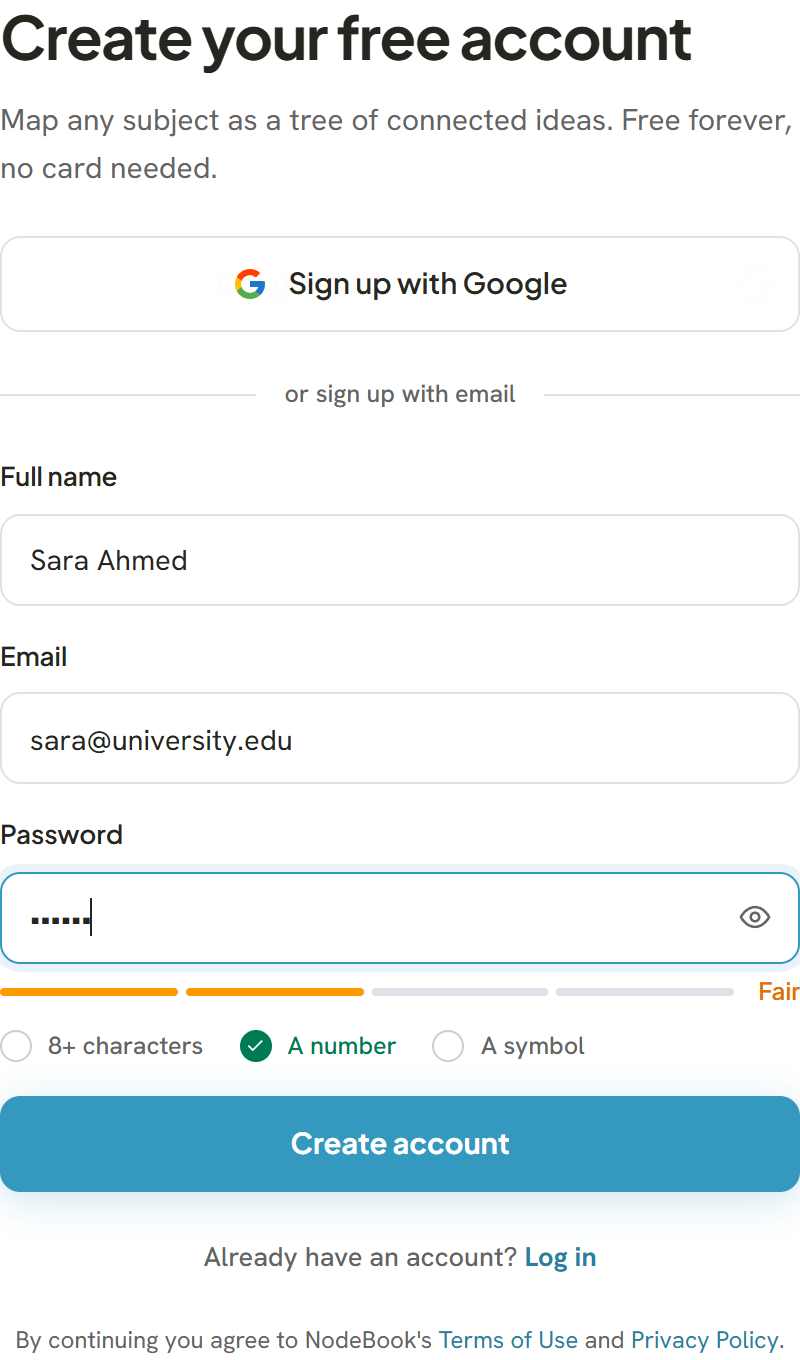
Sign up with Google
- Click Sign up with Google.
- Choose your Google account and allow access.
Your account is ready straight away, and you don't need a separate NodeBook password.
Sign up with email
- Enter your Full name, Email and a Password.
- Click Create account.
Your password needs at least 8 characters. The strength bar under the field also checks for a number and a symbol. They're not required, but they make the password harder to guess.
If you see This email already has a NodeBook account, you've signed up before. Choose Log in instead, or reset your password if you don't remember it.
Confirm your email
After you sign up with email, you see You're in — confirm your email. We send a confirmation link to your address:
- Open the email from NodeBook.
- Click the link. You see Your email is confirmed.
- Click Open NodeBook to start, or Browse the library to look at public NodeBooks first.
The link works for 24 hours. If it has expired or never arrived, see Confirm your email.
By creating an account you agree to NodeBook's Terms of Use and Privacy Policy, linked on the sign-up page.
Was this article helpful?