Duplicate, move, hide or delete a tab
2 min readUpdated 9 days agoBy NodeBook Team
Open a tab's options
In Edit mode, use one of these:
- Right-click the tab, or long-press it on a touch screen.
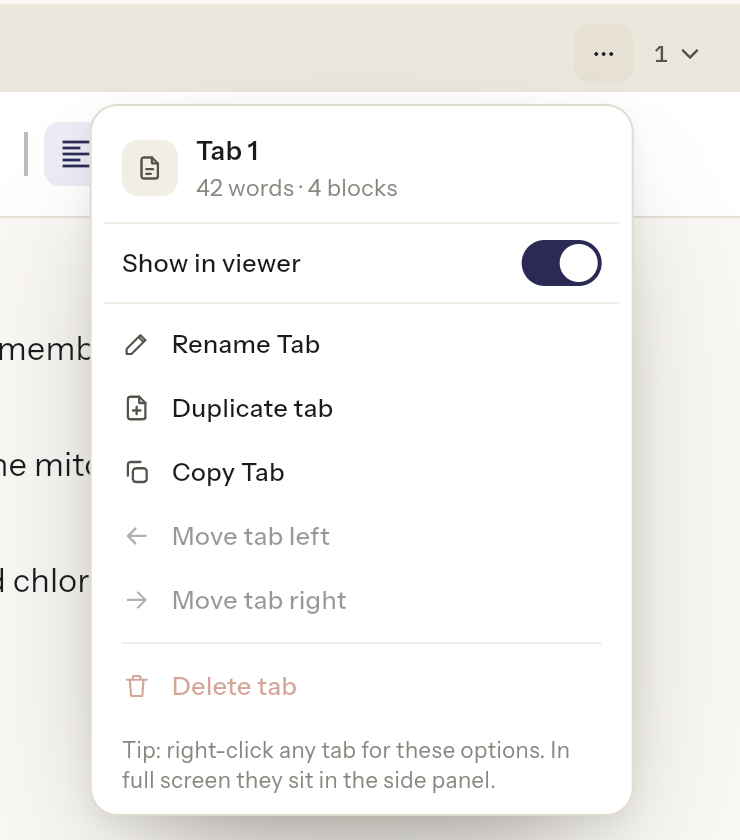
- In the Side Window, click ⋯ at the end of the tab strip (Tab options). It acts on the active tab.
- In the Maximized Window, the options are in the sidebar, under Tab settings.
The top of the menu shows the tab's name and its size, for example 320 words · 14 blocks.
The options
- Show in viewer: turn off to hide this tab from people you share with. You still see it, marked Hidden in viewer.
- Rename Tab: gives the tab a new name.
- Duplicate tab: adds a copy of the tab next to it.
- Copy Tab and Paste Tab: copy a tab, go to another node, open its tab options and choose Paste Tab. Paste Tab only shows once you've copied one.
- Move tab left and Move tab right: change its place in the strip.
- Delete tab: deletes it after you confirm. This can't be undone.
Essential Canvas Controls:
Was this article helpful?